The Consortium for Information & Software Quality (CISQ) estimated that poor software quality cost U.S. organizations at least $2.41 trillion in 2022, with accumulated technical debt making up roughly $1.52 trillion of that total.
Preventing such losses requires more than simply checking whether an application works as expected. Organizations need a comprehensive testing strategy that evaluates functionality, performance, security, usability, compatibility, and reliability across different environments. This is where understanding the different types of software testing becomes essential.
From functional and non-functional testing to manual, automated, and emerging AI-powered approaches, each testing type serves a distinct purpose in identifying defects and strengthening software quality.
In this guide, we’ll explore the major types of software testing, how they work, and when to use them. We’ll also look at how to select the right testing approach, implement effective testing practices, and leverage automation and AI to build more reliable, secure, and high-performing applications.
What Are the Different Types of Software Testing?
Software testing is the practice of checking whether an application does what it should, does it reliably, and doesn’t break when real people start using it in ways nobody planned for. Because “what it should do” covers a lot of ground, testing has split into many specialties. Some tests look at features, others at speed, security or usability, and still others at how pieces of the system talk to each other.
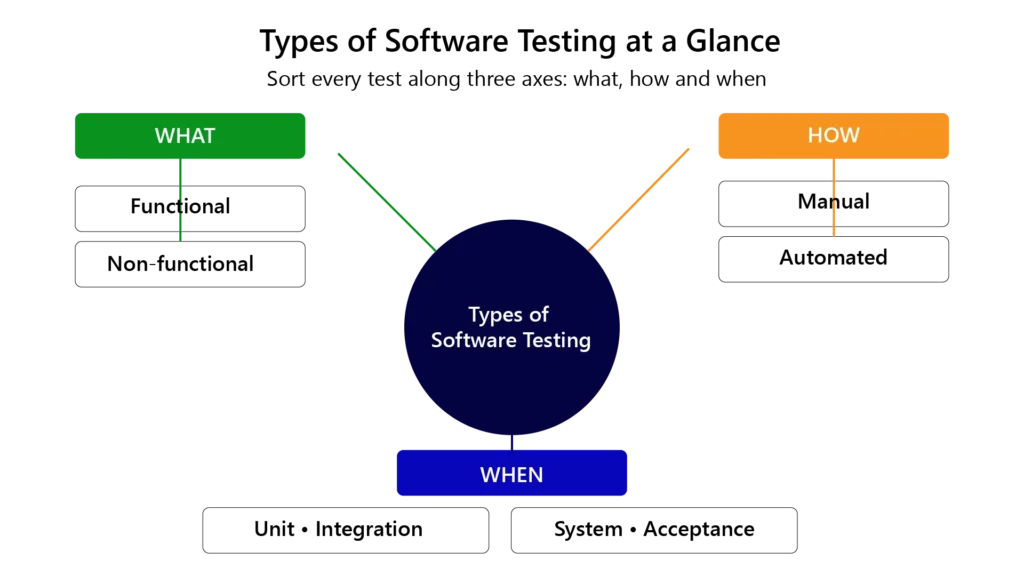
A simple way to make sense of the landscape is to sort tests along a few axes: what you’re checking (functional or non-functional), how you run the test (manual or automated), and when in the lifecycle it happens (unit, integration, system or acceptance). These axes overlap constantly. A regression test, for instance, is functional, usually automated, and typically runs at the system level. Keep that in mind and the long list of testing terms starts to feel a lot more manageable.
There’s one more lens worth knowing, because it shapes many of the software testing methodologies teams use day to day:
Black-box testing
The tester works from requirements and checks inputs against expected outputs, with no view of the code. It’s how most functional and user acceptance testing is done.
White-box testing
The tester has full visibility of the code and designs tests around paths, branches, and conditions. Unit testing is a classic example.
Grey-box testing
A blend of the two. The tester knows some internals, such as the database schema or API contracts, and uses that to aim for tests more precisely. Integration and API testing often live here.
Functional vs. Non-Functional Testing
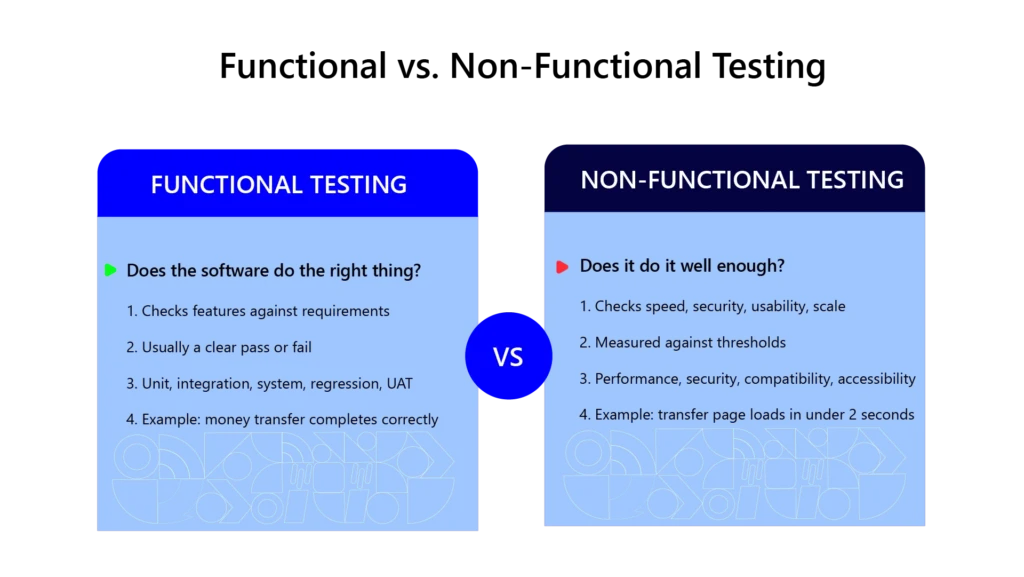
If you only remember one distinction from this guide, make it this one. Functional testing asks, “Does the software do the right thing?” Non-functional testing asks, “Does it do it well enough?” A banking app that transfers money correctly passes the first question. If it takes 40 seconds to load or leaks session data, it fails the second.
| Aspect | Functional Testing | Non-Functional Testing |
|---|---|---|
| Core question | Does each feature work as specified? | How well does the system perform, stay secure and feel to use? |
| Based on | Business and functional requirements | Quality attributes: speed, scale, security, usability |
| Typical examples | Unit, integration, system, regression, smoke, UAT | Performance, security, usability, compatibility, accessibility |
| Pass/fail clarity | Usually binary | Measured against thresholds (e.g., response time under 2 seconds) |
| Typical automation | Very high | Medium to high, depending on type |
Neither one replaces the other. Teams that over-invest in functional checks ship software that works beautifully until it hits 10,000 concurrent users. Teams that obsess over performance but skip functional depth end up with a very fast application that does the wrong thing.
Key Types of Functional Testing
Functional testing verifies that every feature behaves the way the requirements say it should. Here are the types you’ll run into most often, with a quick example of each.
Unit testing
Developers test the smallest pieces of code, usually a single function or method, in isolation. Unit tests are fast and cheap, which is why they form the base of most test strategies.
Example: Confirming that a discount-calculation function returns the right value for a 15% coupon, an expired coupon, and a negative cart total.
Integration testing
Units that work alone can still fail together. Integration testing checks the handoffs, and that’s where many of the nastiest bugs hide at the seams, not inside any one component.
Example: After a customer places an order, does the inventory service reduce stock and does the payment service receive the right amount?
System testing
The complete, integrated application is tested end to end against the requirements in an environment that mimics production.
Example: A tester walks through sign-up, search, add to cart, payment and confirmation email as one continuous flow.
Regression testing
Every new release risk breaking something that used to work. Regression testing re-runs earlier tests to catch exactly that. It’s repetitive by nature, which makes it the number one candidate for automation.
Example: After a new loyalty-points feature ships, the full checkout suite runs again to confirm nothing else moved.
Smoke and sanity testing
Smoke testing is a quick check on a new build to see whether the critical functions work at all. If login fails, there’s no point in testing anything else. Sanity testing is narrower: after a small fix, you confirm that the fix works, and nothing obvious around it has gone sideways.
Example: A new build lands; within minutes, the team confirms login, search and checkout still load.
User acceptance testing (UAT)
Real users or business stakeholders validate that the software meets their needs before go-live. Example: Claim handling team at an insurance company processes a batch of sample claims in the new system to confirm it matches how they actually work. It’s the last gate, and it often surfaces gaps in requirements rather than in code.
Struggling to keep regression suites fast and reliable as releases speed up? See how Quinnox’s software testing services bring automation and intelligence into your functional testing pipeline.
Key Types of Non-Functional Testing
Users rarely praise software for being fast, secure or accessible, but they notice immediately when it isn’t. Non-functional testing protects the experience around your features.
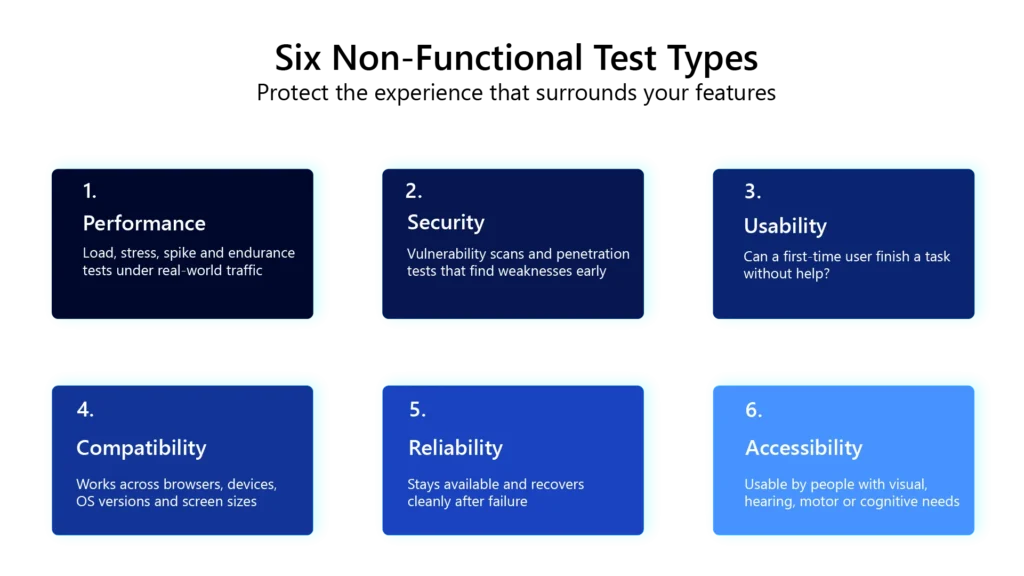
Performance testing
An umbrella for four ways of putting the system under pressure:
- Load testing: behavior under expected traffic
- Stress testing: pushing past the limits to see how and where it breaks
- Spike testing: sudden surges, like a flash sale or a concert ticket drop
- Endurance (soak) testing: steady load for hours or days to expose memory leaks
If you run an e-commerce or banking platform, these tests are non-negotiable.
Security testing
Vulnerability scans, penetration tests, and code reviews look for weaknesses that attackers could exploit, such as injection flaws, broken authentication, and exposed data. With so much of the cost of poor quality tied to cybercrime and vulnerable components, security testing belongs early in the pipeline rather than as a pre-launch checkbox.
Usability testing
Can a first-time user figure out how to complete a task without help? Observing real people (or screen recordings of them) reveals confusing navigation, unclear labels and friction that no automated script will catch.
Compatibility testing
Your application needs to work across browsers, operating systems, screen sizes, and devices. A layout that looks perfect on the latest iPhone can fall apart on a three-year-old Android handset, and the second device may well be your customer’s.
Reliability and recovery testing
What happens when a server goes down mid-transaction? Reliability tests confirm that the system stays available and that it recovers cleanly, without losing or corrupting data.
Accessibility testing
Accessibility checks make sure people with visual, hearing, motor or cognitive disabilities can use your product, typically against WCAG guidelines. Beyond being the right thing to do, it is increasingly a legal requirement in many markets.
Manual vs. Automated Software Testing
Almost every team ends up with a blend of manual and automated testing, so the real question isn’t which is better. It’s about which is better for a particular job.
Where manual testing still wins
- Exploratory testing: a curious human poking around without a script finds oddities that scripted tests never will.
- Usability and look-and-feel checks: judgment about whether something feels right is hard to codify.
- One-off or short-lived features: automating a test you’ll run twice rarely pays back the effort.
Where automated software testing wins
- Regression suites: the same checks, every build, without fatigue.
- Performance and load tests: you can’t recruit 5,000 people to click at once.
- Data-heavy and cross-browser scenarios: the same test across dozens of combinations.
- CI/CD gating: automated checks give fast feedback on every commit.
A practical rule of thumb
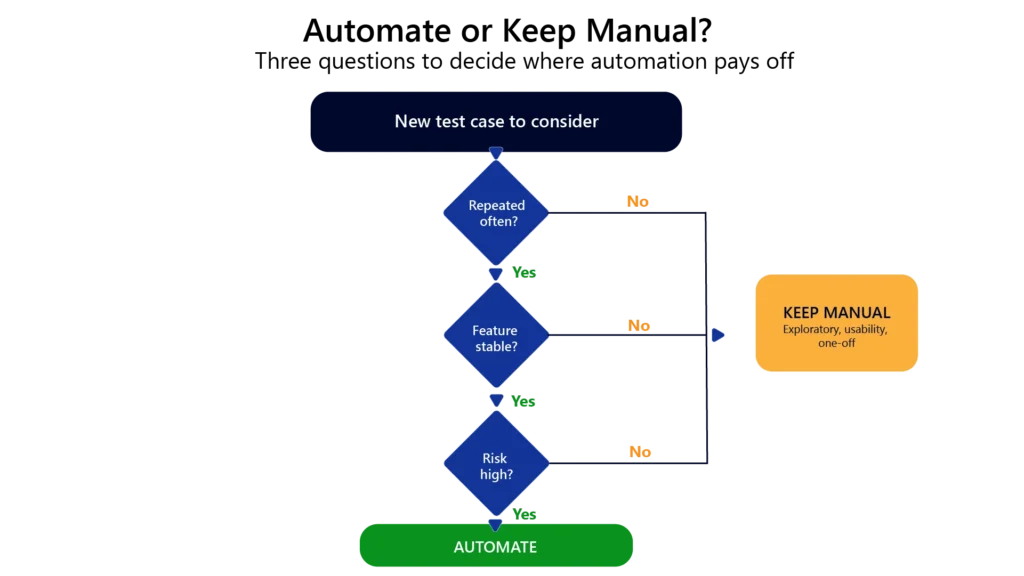
Automate what’s stable, repetitive and high-risk. Keep people on what’s changing, subjective or exploratory. Automation also isn’t free. Scripts need maintenance, and a flaky suite that nobody trusts is worse than no suite at all, because it teaches the team to ignore red builds.
Software Testing Types by Testing Stage
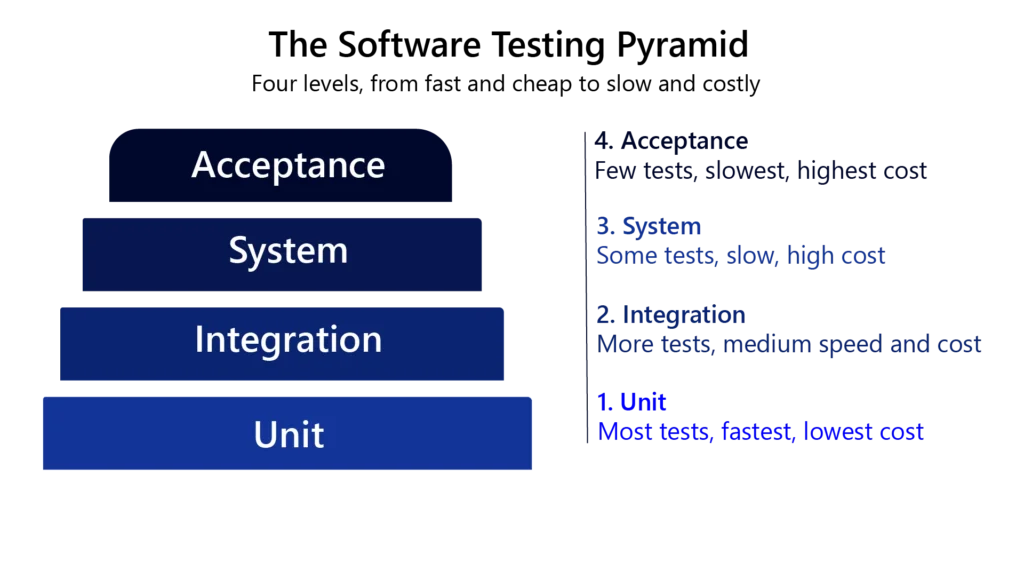
Another popular way to organize testing is by software testing levels, which follow the order in which software moves from code to customer. Most textbooks describe four.
| Level | Who usually runs it | What it checks | Example |
|---|---|---|---|
| 1.Unit | Developers | Individual functions or classes | Tax calculation returns the correct amount |
| 2.Integration | Developers and QA | Interfaces between modules and services | Checkout talks correctly to the payment gateway |
| 3.System | QA team | The complete application against requirements | Full order journey from login to confirmation |
| 4.Acceptance | Business users, product owners | Fitness for real business use | Finance team validates month-end reports |
Testing at lower levels is faster and cheaper, so a healthy strategy has many unit tests, a moderate number of integration tests, and a smaller set of end-to-end and acceptance tests. This is the well-known testing pyramid, and teams that flip it upside down usually end up with slow, brittle pipelines.
Specialized Software Testing for Modern Applications
The classic categories still apply, but modern architectures have created new testing needs. These are the ones we see most often in enterprise programs.
API testing
With microservices and third-party integrations, APIs carry out most of the business logic. API tests check responses, error handling, authentication and contract compliance directly, without going through a slow user interface. They’re quick to run and a great place to catch integration issues early.
Mobile application testing
Mobile adds device fragmentation, OS versions, spotty networks, battery drain and interruptions such as calls and notifications. Real-device coverage matters here, because emulators can’t reproduce every quirk.
Cloud and microservices testing
Distributed systems fail in distributed ways. Teams test service-to-service contracts, resilience under partial failure (chaos testing), autoscaling behavior and environment configuration, not just features.
Data and ETL testing
When reports and AI models depend on pipelines, bad data quietly translates into bad decisions. Data testing validates completeness, accuracy, and transformation logic as records move between systems.
AI and machine learning testing
Models don’t behave like conventional code, since the same input can produce different outputs. Testing here includes accuracy and bias checks, robustness against unusual inputs, and monitoring for drift once the model is live.
Testing an app that spans cloud, mobile and legacy systems? Talk to Quinnox’s quality engineering experts about building a test strategy that covers the whole stack.
How to Choose the Right Types of Software Testing
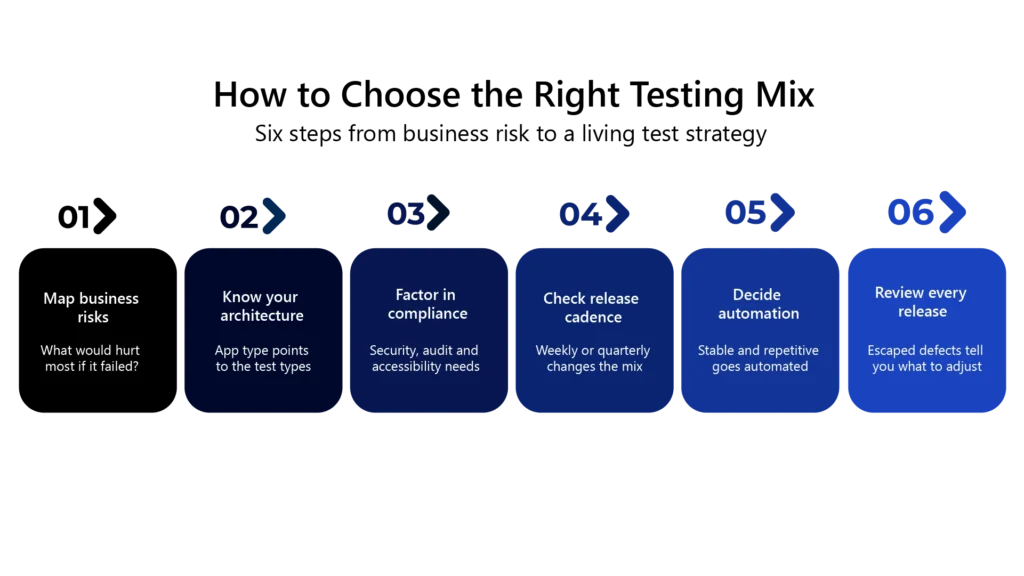
You can’t test everything, and you shouldn’t try it. The goal is to match testing effort to business risk. Here’s a step-by-step way to do that.
Step 1: Map the business risks
Begin by identifying the potential impact of a failure across your application. Consider factors such as revenue loss, regulatory non-compliance, safety risks, and reputational damage. Not all features carry the same level of risk, so testing efforts should be prioritized accordingly. For instance, a payment processing feature requires more rigorous testing than an internal wiki page, given the potential business and customer impact of failure.
Step 2: Understand your application type and architecture
A customer-facing mobile app needs strong compatibility and usability coverage. An API-led platform needs contract and performance testing. A data warehouse needs data validation. Let the architecture point you to the relevant test types.
Step 3: Factor in compliance and security needs
Industries such as healthcare, banking, and insurance operate under stringent regulatory, security, audit, and accessibility requirements. If your organization operates in any of these sectors, identify the applicable compliance obligations early and build them into your testing strategy. This ensures they are validated throughout the development lifecycle rather than treated as last-minute checks.
Step 4: Look at your release cadence
If you deploy weekly or daily, you’ll need automated regression and smoke tests in the pipeline. If you release quarterly, you have room for longer manual cycles, though you’ll pay for it in feedback time.
Step 5: Decide what to automate and what to keep manual
Use the rule of thumb from earlier: stable, repetitive and high-risk goes to automation, while exploratory and subjective stays with people.
Step 6: Review and adjust after every release
Look at escaped defects, flaky tests and coverage gaps. Where did bugs slip through? Which tests never caught anything? Your mix should evolve with the product.
Best Practices for Building a Software Testing Strategy
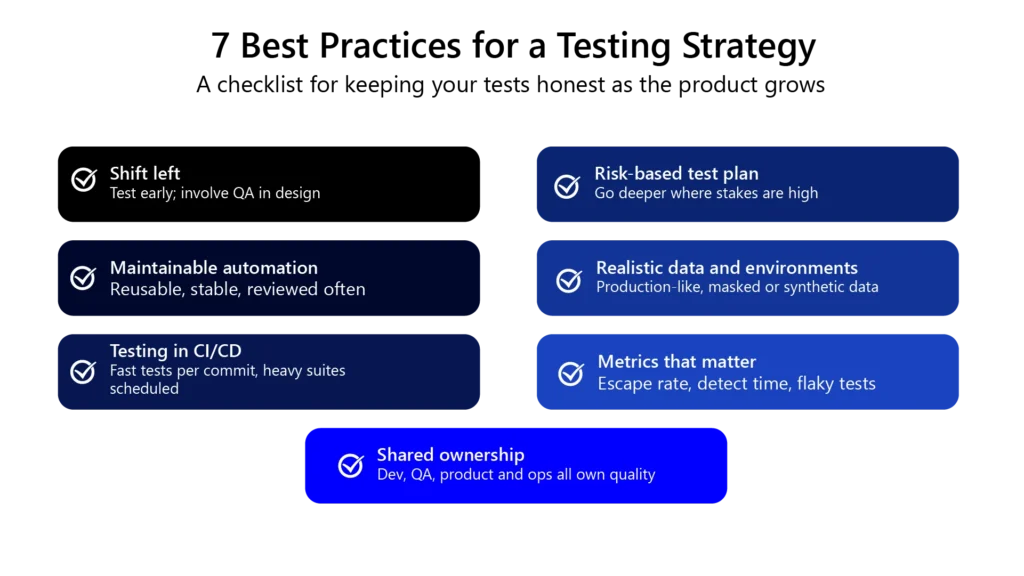
Choosing test types is only half the job. How you run them determines whether they actually protect you.
1. Shift left
The earlier a defect is found, the cheaper it is to fix. Involve testers in requirement reviews and design discussions, and have developers run unit and API tests before code is even merged.
2. Build a risk-based test plan
Rank features by likelihood and impact of failure, then go deeper where the stakes are highest. It’s a more honest approach than chasing a blanket coverage number.
3. Keep automation maintainable
Use reusable components, stable locators, and clear naming. Review the suite regularly and delete or fix tests that fail without reason. Treat test code with the same care as production code.
4. Invest in realistic test data and environments
Tests that pass on a tidy dataset in a stripped-down environment can fail the moment they meet production-like conditions. Use masked or synthetic data that reflects real-world variety.
5. Integrate testing into CI/CD
Run fast tests on every commit and heavier suite on a schedule or before release. Fast feedback keeps developers fixing issues while the code is still fresh in their minds.
6. Track the metrics that matter
Defect escape rate, mean time to detect, test execution time and flaky-test rate say far more about quality than the raw number of test cases. Share them openly so quality becomes a team conversation, not just a QA one.
7. Make quality a shared responsibility
Effective quality assurance is not the sole responsibility of the testing team. It requires a collaborative effort across developers, testers, product owners, and operations teams, with each contributing to quality at every stage of the development lifecycle. Embedding this shared ownership into Agile and DevOps practices helps identify issues earlier, streamline collaboration, and deliver more reliable software.
The Role of AI and Automation in Software Testing
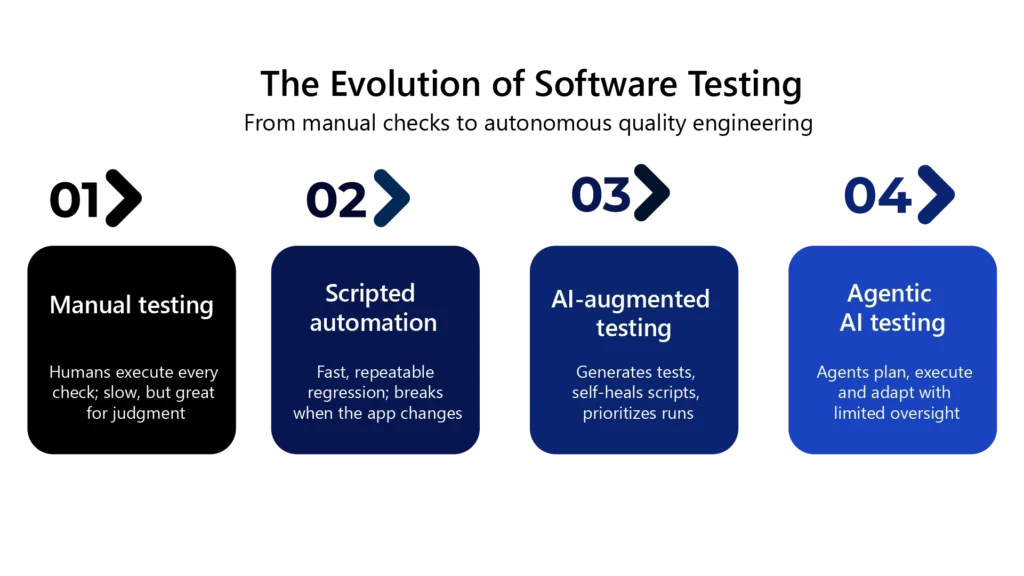
Traditional automation does exactly what it’s scripted to do, and it breaks when the application changes. AI-augmented testing aims to fix that by generating test cases, healing broken scripts, prioritizing which tests to run, and spotting patterns in failures that humans would take hours to find.
The growing adoption of AI in software testing further highlights this shift. Gartner forecasts that by 2027, 80% of enterprises will have integrated AI-augmented testing tools into their software engineering toolchain, up from approximately 15% in 2023. This rapid shift is encouraging organizations to rethink their testing strategies, technology investments, team capabilities, and processes.
The evolution is now moving beyond AI-assisted automation towards greater autonomy. Agentic AI testing introduces AI agents that can plan testing strategies, execute test scenarios, analyze outcomes, and adapt their approach with limited human intervention. While this approach is still evolving, human oversight remains essential for business-critical decisions, contextual judgment, and governance. The goal is not to replace human expertise but to augment it, enabling testing teams to focus more on complex scenarios, risk assessment, and overall software quality.
Where AI helps most today
- Generating test cases and test data from requirements or user stories
- Self-healing scripts that adapt when UI elements change
- Risk-based test selection, so you run the tests most likely to catch a defect
- Faster root-cause analysis of failures and flaky tests
A word of caution
AI isn’t magic. Generated tests still need review, tools can inherit bias from their training data, and teams need clear rules for data privacy. Start with a focused pilot, measure the impact, and scale from there.
Curious what agentic AI could do for your QA pipeline? Read our deep dive on agentic AI testing or explore Quinnox’s AI-powered testing services.“Great software isn’t the result of testing harder. It’s the result of testing smarter. When teams understand the full range of testing types and apply them with business priorities in mind, quality stops being a last-minute checkpoint and becomes a genuine competitive advantage.” – Bighneswar Parida, Director Quality Engineering, Everforth Quinnox
Conclusion
The effectiveness of a software testing strategy lies not in choosing one type of testing over another, but in finding the right combination for your product, users, and risk priorities. Functional testing validates whether features work as intended, while non-functional testing evaluates how well they perform under real-world conditions. A thoughtful balance of manual and automated testing ensures faster feedback without compromising human judgment. Complementing these with specialized testing across APIs, mobile, cloud, and data, along with AI-driven capabilities where they add value, helps build a more comprehensive approach to quality engineering.
Therefore, before jumping onto any specific testing type, make sure to identify potential risks first, then assess your existing testing coverage, and finally address the gaps that matter most. This will help you move beyond simply detecting defects to preventing them earlier all while improving release confidence and delivering more reliable software experiences.
Ready to build a testing strategy that keeps pace with your releases? Connect with Quinnox’s testing experts and let’s talk about what intelligent quality engineering could look like for your business.

Assistant Manager – Marketing (Analyst Relations), Everforth Quinnox
FAQs
The four levels are unit testing, integration testing, system testing, and acceptance testing. They run in that order, moving from individual code components to the complete system and finally to validation by business users.
Prioritize tests that are repetitive, stable, and high-risk: regression, smoke, API, performance and cross-browser tests are the usual candidates. Exploratory, usability, and one-off tests are generally better left to human testers.
Start with business risk, then consider the application’s architecture, compliance requirements, and release frequency. A payments platform will lean on security and performance testing, while a content-heavy mobile app will emphasize compatibility and usability. Review the mix after each release and adjust.
In Agile and DevOps, testing is continuous rather than a phase at the end. Testers join the team from the start, automated tests run inside CI/CD pipelines on every change, and feedback loops are measured in minutes instead of weeks. The emphasis moves from finding bugs late to preventing them early.
AI helps teams generate test cases, maintain scripts, prioritize what to run, and analyze failures faster. It’s now moving toward agentic AI testing, where agents can plan and execute testing with limited supervision. Human oversight is still essential for judgment, context, and governance.