Accelerate IT operations with AI-driven Automation
Automation in IT operations enable agility, resilience, and operational excellence, paving the way for organizations to adapt swiftly to changing environments, deliver superior services, and achieve sustainable success in today's dynamic digital landscape.
Driving Innovation with Next-gen Application Management
Next-generation application management fueled by AIOps is revolutionizing how organizations monitor performance, modernize applications, and manage the entire application lifecycle.
AI-powered Analytics: Transforming Data into Actionable Insights
AIOps and analytics foster a culture of continuous improvement by providing organizations with actionable intelligence to optimize workflows, enhance service quality, and align IT operations with business goals.
Digital experiences have become the front door of modern business. For most enterprises today, a web application is not simply a digital channel; it is where revenue is generated, customer relationships are formed, and brand trust is earned or lost. A slow, insecure, or unreliable web application can quickly lead to cart abandonment, data exposure, and reputational damage.
User tolerance for failure is extremely low. According to Google, 53% of mobile users abandon a website if it takes more than three seconds to load. At the same time, Akamai reports that even a 100-millisecond delay in page load time can reduce conversion rates by 7%.
In a world of accelerated release cycles, growing security threats, and usage across many devices and browsers, every web application must deliver fast responses, intuitive journeys, and stable performance. The most reliable safeguard is a comprehensive web application testing practice that detects risks early, ensures predictable performance, and protects customer trust as systems evolve.
This blog explores why web application testing is critical today, the benefits it delivers, key techniques and strategies, major challenges, best practices, and a practical step-by-step guide to testing. It also provides actionable guidance and answers to frequently asked questions.
To learn the foundations of application quality, explore the Quinnox guide on What is application testing.
Why Web Application Testing is Critical Today
Web applications are no longer static information pages; they are dynamic platforms that handle transactions, user authentication, personalization, data exchange, and multi-system integrations. This complexity significantly increases the potential business impact of defects.
1. Increasing Digital Dependence
Enterprises now rely on web applications as primary channels for revenue generation, customer engagement, and service delivery. According to McKinsey, more than 70% of customer journeys now involve digital touchpoints. Even minor issues such as broken flows, failed payments, or confusing navigation can directly reduce conversion rates and customer satisfaction. Industry benchmarks show that organizations delivering seamless digital journeys consistently achieve higher loyalty and repeat usage.
2. Growing Security Threat Landscape
Attackers frequently target web applications because they are externally exposed and often process sensitive data such as personal information, credentials, and payment details. Security testing helps identify vulnerabilities, such as injection flaws, authentication weaknesses, and insecure session handling, that could otherwise lead to financial loss and regulatory penalties.
3. Multi-Device and Multi-Browser Usage
Users switch between laptops, tablets, and phones – often across different browsers and operating systems – expecting consistent behavior everywhere. StatCounter shows that there are more than 20,000 active device-browser combinations in global use.
Without Cross-browser and cross-device testing enterprises risk delivering broken or inconsistent experiences to large segments of their users.
4. Continuous Delivery Expectations
Modern development approaches (Agile, DevOps, CI/CD) introduce frequent updates and releases. Without continuous and automated testing integrated into the pipeline, even a small code change can silently break critical functionality or degrade performance.
Unlock seamless digital experiences with tailored Software testing solutions.
Key Benefits of Web Application Testing
A mature web application testing practice delivers both technical and business value.
- Enhances User Experience
Testing helps uncover navigation issues, broken links, inconsistent layouts, and confusing workflows before they impact customers. Well-designed usability and functional tests ensure intuitive journeys and reduce friction across the end-to-end user flow.
- Improves Functional Quality
Functional tests verify that each feature works as specified and that business rules are enforced correctly across different scenarios, including edge cases and negative inputs. This leads to stable, predictable behavior and fewer production incidents.
- Strengthens Application Security
Security testing identifies vulnerabilities such as SQL injection, cross-site scripting, insecure direct object references, and weak authentication or authorization controls. Addressing these proactively protects both organizational and customer data.
- Supports Performance and Scalability
Performance testing evaluates response time, throughput, resource utilization, and stability under normal and peak load. This prepares teams for traffic spikes, marketing campaigns, and seasonal peaks with confidence.
- Reduces Long-Term Costs
Defects detected late in the lifecycle are significantly more expensive to fix than those caught earlier. Shift-left testing and continuous validation help prevent critical issues from reaching production and reduce the risk of outages or emergency fixes.
- Protects Brand Reputation
Reliable, fast, and user-friendly web applications enhance customer trust and brand perception. Consistent quality encourages positive word of mouth and repeat engagement.
Web Application Testing Techniques and Approaches
Different testing techniques provide complementary perspectives on quality. A well-rounded strategy blends several of these methods.
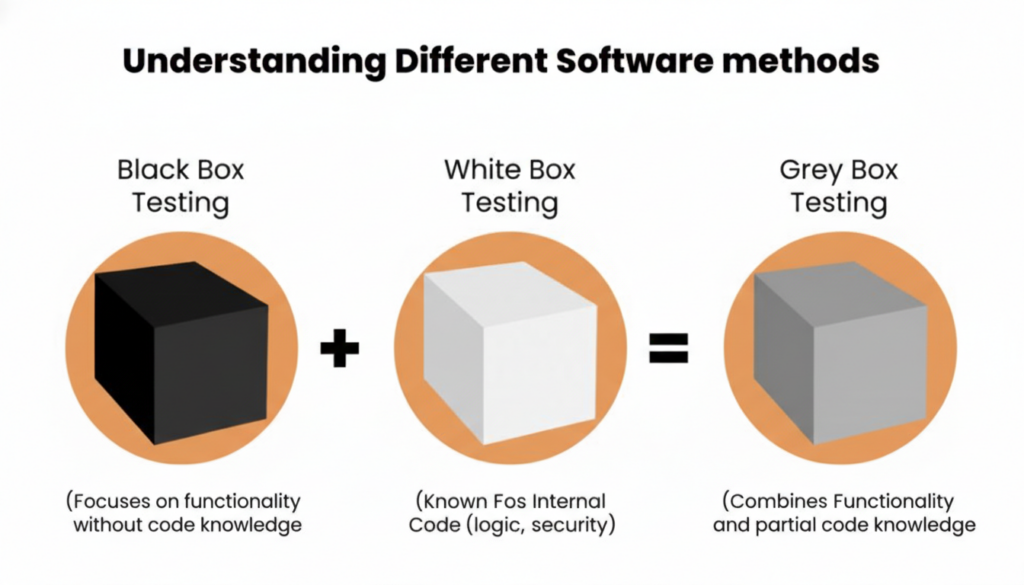
- Black Box Testing
Evaluates the application from the user’s perspective by focusing on inputs and outputs rather than internal code structure. Black box testing is ideal for validating user-facing features and business workflows.
- White Box Testing
Examines internal logic, code branches, and data flows, usually performed by developers or technical testers. This helps improve code coverage and detect logic errors, boundary issues, and unreachable paths.
- Gray Box Testing
Combines both external behavior and partial knowledge of internal design or architecture. This approach helps design more focused test scenarios for complex, integrated systems.
- Automated Testing
Uses tools and frameworks to execute repeatable test suites efficiently, particularly for regression, smoke, and performance testing. Automation is essential for CI/CD pipelines and frequent releases.
- Manual Testing
Allows testers to exercise exploratory, usability, and visual checks that benefit from human judgment. Manual testing remains important for validating user experience and unexpected interaction patterns.
- Risk-Based Testing
Prioritizes testing on areas with highest business impact, such as payment flows, authentication, and frequently used features. This ensures limited time and resources focus on the most critical risks.
For mobile-specific quality needs, explore Mobile application testing best practices.
Web Application Testing Strategy
A clear strategy ensures direction, alignment, and maximum coverage across teams and releases.

Define Clear Objectives
Start by identifying business goals, critical use cases, compliance requirements, and key risk areas. A concise test objective helps determine what “success” looks like for each release.
Understand the Architecture
Gain an understanding of the application’s components, third-party services, APIs, data flows, and integration points. Architectural knowledge helps shape more effective test scenarios and uncover potential failure modes.
Build a Comprehensive Test Plan
The test plan should define scope, test types, roles, environments, timelines, tools, and acceptance criteria. Leading teams also document constraints, entry/exit criteria, and reporting mechanisms in the plan.
Develop Test Scenarios and Test Cases
Design scenarios that cover positive paths, negative inputs, boundary values, error handling, and alternate flows. Risk-based selection helps focus on critical paths and high-usage features first.
Prioritize Automation
Identify stable, repeatable tests suitable for automation, such as regression and smoke suites, and integrate them into CI/CD pipelines. Automated suites provide fast feedback on code changes and help maintain release velocity.
Ensure Realistic Test Environments
Test environments should closely mirror production in terms of configurations, data, integrations, and security settings. Representative environments generate more reliable performance, security, and compatibility insights.
Execute Tests, Analyze, and Retest
Run planned tests, log defects with severity and business impact, and collaborate closely with developers for remediation. Retest fixes and run regression tests to ensure changes do not introduce new issues.
Explore Quinnox’s Testing and Test Automation Services to build a future-ready testing strategy.
Challenges in Web-Based Testing
Despite its importance, web application testing faces several recurring challenges.
Browser Rendering Differences
Browsers interpret HTML, CSS, and JavaScript differently, creating inconsistencies in layout, interactions, and behavior. Cross-browser testing is necessary to validate core flows and UI consistency.
Device Diversity
Variations in screen sizes, resolutions, hardware capabilities, and input methods complicate responsive and mobile web testing. Teams must test across a range of real devices and configurations.
Frequent Code Changes
Agile and DevOps practices increase release frequency, expanding the regression surface area. Without adequate automation and effective test maintenance, testing workloads can quickly become unmanageable.
Integration Dependencies
Web applications often rely on external APIs, payment gateways, authentication providers, and other services. Failures or slow responses from dependencies can degrade end-to-end user experience and are difficult to simulate consistently.
Complex Security Requirements
Evolving regulations and threat landscapes require continuous, in-depth security validation. Maintaining up-to-date test coverage for authentication, authorization, data protection, and logging is demanding.
Test Data Preparation
High-quality, representative test data is essential but can be hard to generate and maintain at scale while respecting privacy and compliance requirements.
Best Practices for Effective Web Application Testing
Adopting structured best practices improves efficiency, coverage, and reliability.
Start Early with Shift-Left Testing
Embedding testing earlier in the development lifecycle reduces risk and cost by detecting defects when they are cheapest to fix. Shift-left approaches often combine unit, API, and automated UI tests integrated with CI/CD.
Blend Automation and Manual Testing
Automation accelerates regression and repetitive checks, while manual and exploratory testing validate usability, accessibility, and visual quality. A hybrid approach aligns with how high-performing teams operate today.
Maintain Reliable Test Data
Use organized, anonymized datasets that represent real-world scenarios, and refresh them regularly. Proper test data management enables meaningful functional, performance, and security tests.
Test on Real Devices
Emulators and simulators are useful but cannot fully replicate real-world conditions such as device performance and hardware quirks. Adding real-device testing improves confidence in mobile and responsive behavior.
Integrate Testing into CI Pipelines
Automated tests running on every code change or build provide rapid feedback and reduce the risk of regressions. CI integration is now considered a standard best practice for modern web teams.
Document Test Processes Clearly
Well-documented test strategies, cases, and procedures support scaling teams, onboarding, and continuous improvement. This includes version-controlled test assets and clear naming conventions.
Regularly Review and Optimize Test Suites
Remove obsolete test cases, consolidate duplicates, and update coverage to match evolving features and risks. Periodic pruning ensures faster execution and more focused feedback.
How to Test a Web Application or Website: Step-by-Step
A structured approach helps ensure thorough coverage of both websites (primarily informational) and web applications (interactive, transactional systems).
Step 1: Functionality Testing
Functionality testing is the foundation of web application testing. It validates that each feature operates according to defined requirements and business rules under expected conditions.
Typical activities include:
- Identifying features and workflows the application must support, such as login, search, checkout, and form submissions.
- Designing test cases from requirements and user stories, providing inputs to features and validating outputs against expected results.
- Simulating realistic user conditions, including different operating systems and basic compatibility scenarios.
For websites, functionality testing often includes verifying all internal, external, anchor, and email links; testing forms for default values, validation rules, and error messages; checking cookies and session handling; and validating HTML/CSS syntax. Standards compliance and end-to-end business workflow validation help ensure a seamless experience.
Step 2: Usability Testing
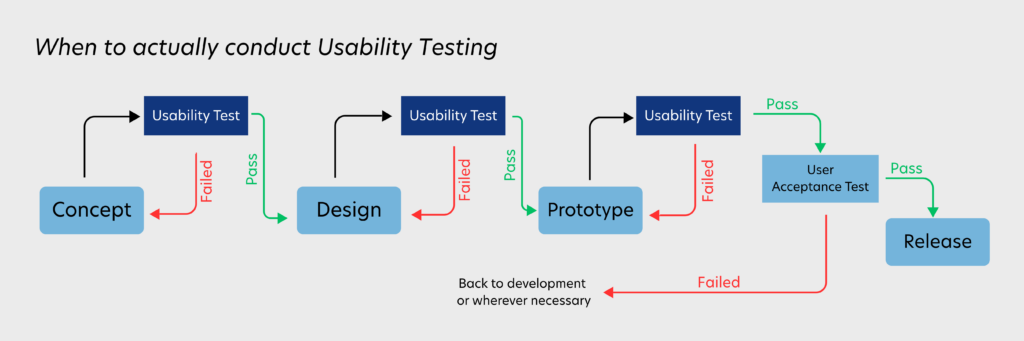
Usability testing focuses on how easily users can navigate and complete tasks within the application. It assesses clarity, intuitiveness, content presentation, and overall satisfaction.
Key activities:
- Defining usability objectives covering navigation clarity, content readability, and task completion paths.
- Selecting participants who represent the target audience, from internal stakeholders or external user groups, sometimes through remote testing platforms.
- Observing users as they attempt typical tasks, collecting feedback on pain points, confusion, and satisfaction, then refining design and flows based on insights.
Usability testing differs from user acceptance testing (UAT): usability focuses on user experience quality, while UAT validates that the system meets business requirements before go-live.
Step 3: Interface Testing
Interface testing verifies interactions between the web application, web server, and database server. The goal is to ensure reliable communication, accurate data exchange, and robust error handling.
Typical checks include:
- Ensuring requests generated by the web application are correctly transmitted and that responses are returned without corruption or unexpected errors.
- Validating that the web server responds appropriately to all application requests and that the database processes queries accurately.
- Confirming that user interruptions, timeouts, or backend failures are handled gracefully with clear messages rather than application crashes.
Step 4: Compatibility Testing
Compatibility testing ensures consistent performance and behavior across browsers, devices, and operating systems.
Areas to cover:
- Browser compatibility: Validate functionality, layout, scripts, and asynchronous requests across major browsers and relevant versions. Cross-browser testing is a commonly recommended practice in modern web testing guides.
- Operating system compatibility: Verify that the application works smoothly across platforms such as Windows, macOS, Linux, Android, and iOS.
- Mobile compatibility: Confirm that responsive layouts, touch interactions, and mobile-specific features behave consistently across different screen sizes and orientations.
Step 5: Performance Testing
Performance testing evaluates how the application behaves under varying levels of load, concurrency, and network conditions.
Core types include:
- Load testing: Measures behavior under expected user volumes and typical traffic.
- Stress testing: Pushes load beyond normal limits to identify breaking points and bottlenecks.
- Scalability testing: Assesses how well the application scales as load, data, or concurrent users increase.
Key metrics monitored include response times, latency, throughput, error rates, and resource utilization. Effective performance strategies consider caching, load balancing, capacity planning, and failover mechanisms to maintain responsiveness and reliability.
Step 6: Security Testing
Security testing ensures that the web application can withstand unauthorized access attempts, malicious input, and common attack patterns.
Common security testing activities involve:
- Verifying access control for restricted areas, session expiration after inactivity, and proper use of secure transport (for example, HTTPS).
- Testing input validation, output encoding, and error handling to mitigate injection and cross-site scripting risks.
- Attempting actions such as accessing internal pages without authentication, tampering with URLs, submitting invalid data, bypassing authorization, or abusing session tokens.
A structured security checklist typically covers data transmission, authentication, session management, authorization, encryption, denial-of-service resilience, logging, and monitoring.
Additional Web Testing Scenarios: Crowd Testing
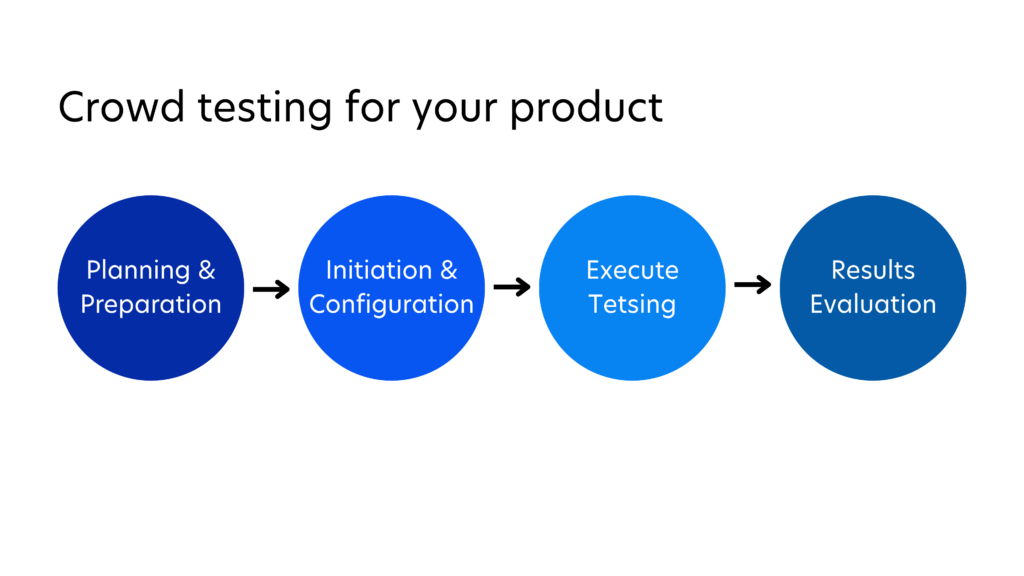
Crowd testing expands coverage by engaging a diverse group of external testers using different devices, networks, and real-world environments. This approach often reveals issues that may not emerge in controlled internal environments.
To prepare for crowd testing:
- Define clear objectives, scope, and scenarios that reflect realistic user behavior.
- Select an appropriate platform or community, recruit a diverse tester base, monitor execution, and consolidate feedback into actionable defects and enhancements.
Crowd testing complements, rather than replaces, internal QA, usability, and UAT activities, and is particularly valuable for consumer-facing or globally used applications.
Conclusion
Every organization now operates in an environment where customer expectations evolve rapidly and technology changes continuously. Web application testing empowers businesses to stay ahead by ensuring reliability, performance, and security at every stage of the digital journey.
With a strong strategy, modern techniques, and a balanced mix of automation and human insight, teams can deliver web applications that perform flawlessly, scale with demand, and protect brand reputation. For enterprises running both complex internal systems and customer-facing platforms, a mature testing practice has become a fundamental requirement for digital success.
This is where Quinnox’s Application Testing as a Software (ATaS) makes a measurable difference. Rather than relying on periodic testing cycles or adding more manual effort, ATaS embeds quality into the application lifecycle itself. Every code change, UI update, API modification, and performance variation is automatically validated across devices, browsers, and environments.
AI-driven test intelligence identifies high-risk areas, dynamically adapts coverage, and continuously safeguards critical user journeys – turning web application testing from a reactive process into a living, proactive system capability.
So why wait? Connect with Quinnox to strengthen your digital quality!

The Everforth Quinnox Editorial Team is a collaborative group of technologists, consultants, and industry experts passionate about digital innovation. We’re dedicated to sharing practical insights, trends, and thought leadership across digital transformation, cloud, data & AI, automation, enterprise platforms, and modern engineering. Drawing from real-world experience across industries, we publish clear, actionable perspectives that help organizations navigate complex technology landscapes. Our goal is to deliver trusted, easy-to-understand content that enables smarter decisions, accelerates innovation, and drives measurable business outcomes.
FAQ's on Web Application Testing
A website primarily delivers informational content, so testing focuses on layout, readability, navigation, and basic interactions. A web application is interactive, involving user inputs, data processing, authentication, and transactions, so testing must deeply validate business logic, security, data integrity, and integration points.
Manual testers verify each feature step by step, exercising navigation, forms, content, responsiveness, and visual consistency across devices and browsers. Exploratory testing is often used to uncover unexpected usability problems and edge-case defects beyond scripted tests.
Typical issues include broken links, JavaScript errors, misaligned elements, incorrect input validation, session handling problems, inconsistent behavior across browsers, and integration failures with third-party services.
Complete automation is not realistic because usability, visual appearance, exploratory assessments, and certain security checks require human judgment. The most effective approach combines automated regression, performance, and API tests with targeted manual and exploratory testing.