Digital products today are born global. Whether it’s a banking app in the USA, an e-commerce platform in Brazil, or a healthcare portal in the Middle East, users expect experiences that feel native, intuitive, and culturally aligned, not simply “translated.”
Verified industry research reinforces this shift:
- 76% of consumers prefer buying products with information in their own language (CSA Research)
- 40% of global users will never buy from websites in other languages (CSA Research)
- Localizing mobile apps can increase downloads by up to 128% and revenue by 26% or more (Distimo Mobile Analytics)
- The global localization testing services market is growing at 10–12% CAGR through 2033 (HTF Market Intelligence, CMR)
The message is clear: localization is no longer a linguistic activity, it is a business strategy.
A payment workflow that breaks in Europe because of number formatting, a UI that overflows in German, an icon that is culturally inappropriate in the Middle East, or a Japanese user seeing mistranslated medical instructions – these are not minor defects. They are brand risks, conversion killers, and global scalability blockers.
For engineering and QA leaders, this creates a new imperative:
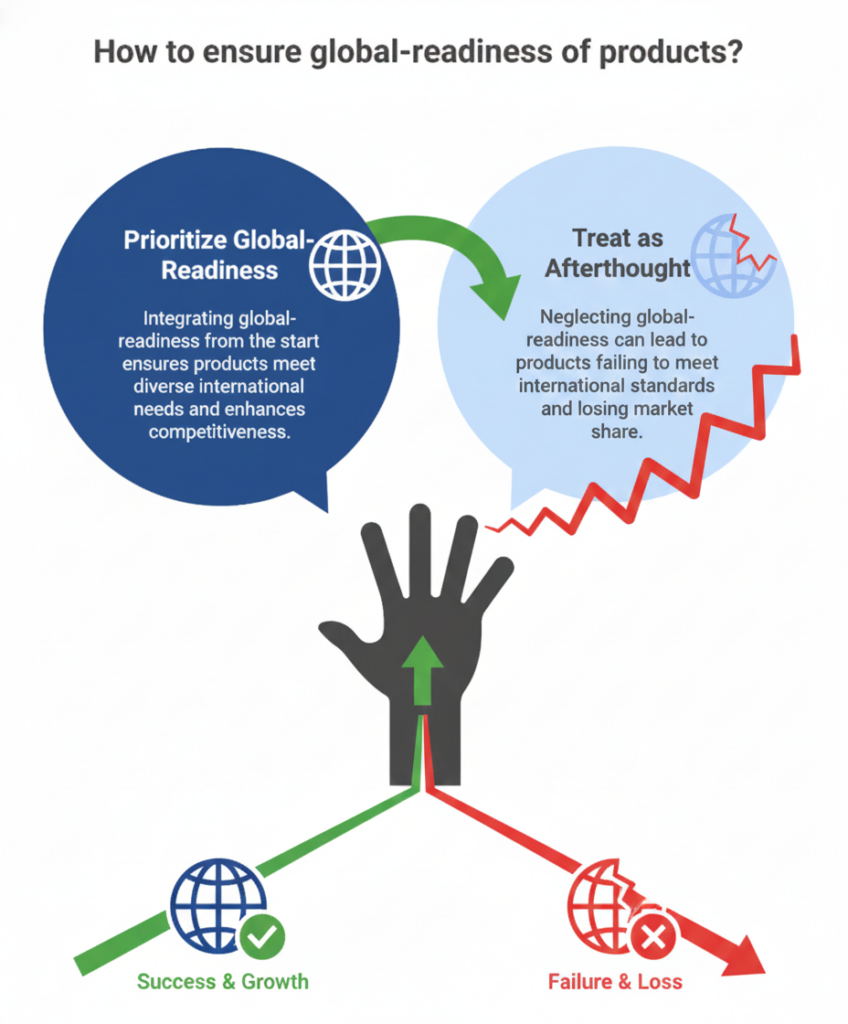
Products must be built, tested, and released with global-readiness at the core, not as an afterthought.
That’s where localization testing in software testing steps in, not as a checkbox, but as a critical engineering discipline that shapes user trust, market expansion, regulatory compliance, and product success worldwide.
A Real Incident: Amazon’s Sweden Launch Shows What Happens When Localization Fails
When Amazon launched its Swedish marketplace in 2020, the rollout immediately ran into trouble. According to Reuters and The Guardian, the site went live with:
- Mistranslated product names and descriptions
- Culturally inappropriate or offensive terms
- Incorrect images and category labels
- Even the wrong national flag displayed on the site
None of these were functional defects. They were localization failures, and they became a global PR issue within hours.
The result:
- Negative media coverage across Sweden
- Thousands of viral screenshots on social platforms
- Rapid corrections and a public statement from Amazon acknowledging the errors
The lesson was simple – even the world’s largest engineering teams can stumble when localization isn’t tested thoroughly before launch.
What Is Localization Testing in Software? (L10N vs i18n Explained in Simple Terms)
Localization testing ensures that a product works functionally, linguistically, and culturally for every target market. It goes far beyond translation. It validates whether an application truly behaves as if it were built for that region from day one.
To understand localization testing, it helps to separate two closely related concepts:
Localization (L10N)
Localization adapts the product to a specific language, culture, and market.
This includes:
- language, tone, and terminology
- currency, date, time, number formats
- cultural conventions and symbols
- images, colors, layouts, iconography
- business rules and workflows unique to the region
Localization answers one question: does this product feel local?
Internationalization (i18n)
Internationalization ensures the product is technically ready to support multiple locales without code changes.
This includes:
- externalizing strings
- supporting Unicode/UTF-8
- enabling RTL (right-to-left) layouts
- allowing dynamic text expansion
- designing flexible UI containers
- locale-aware data handling
Internationalization answers: can this product scale globally?
Why both matter
You cannot test localization effectively if the product isn’t internationalized.
Similarly, a technically i18n-ready product still fails without cultural and linguistic accuracy.
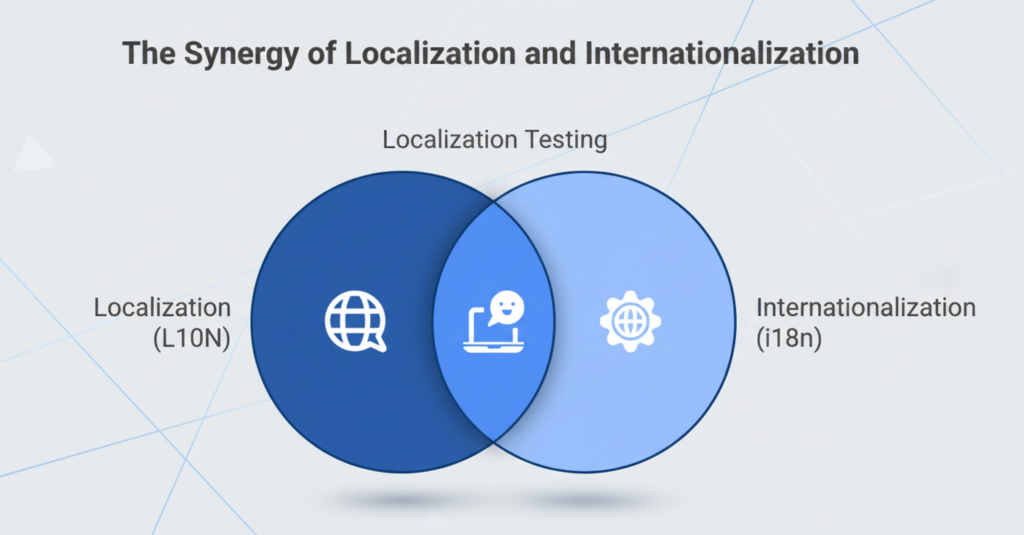
Localization testing sits at the intersection, validating that:
- translations are correct
- functionality behaves correctly per locale
- UI adapts without breaking
- workflows follow local norms
- the entire experience feels native
Why Localization Testing Matters More Today
Localization isn’t new, but the stakes are dramatically higher today. As digital products scale globally in months, not years, engineering and QA leaders re now treating mobile app localization testing and similar other testing approaches as an essential part of their broader software testing solutions strategy.
1. Products are now global from day one
Most digital platforms don’t launch in a single market anymore. A release in North America almost always follows with launches in Europe, Asia, and the Middle East. With that comes a simple reality: even one localization automation testing flaw can stall an entire regional rollout.
2. Multilingual users expect native experiences
Research consistently shows consumers trust, engage, and convert more when applications feel local, not translated.
3. Cultural nuances matter
Colors, icons, images, gestures, metaphors, and even humor vary across markets. A mismatch can damage perception instantly.
4. Region-specific compliance is non-negotiable
Whether it’s GDPR consent text in Europe, payment validations in the Middle East, or tax formats in LATAM, regulatory requirements often depend on correct localization. A small formatting error can lead to failed transactions or compliance violations.
5. AI-driven content generation multiplies the volume of what needs testing
Products today have many more screens, language variants, automated responses, and dynamic content. As AI creates more text than ever, manual localization review becomes impossible to scale.
The Hidden Costs of Poor Localization
Localization issues rarely look catastrophic at first, but their impact spreads quickly across experience, cost, and credibility.
1. Dropped conversions
A broken currency format, a trimmed CTA, a field that rejects local characters – these are smaller issues that quietly kill sign-ups and purchases.
2. Public embarrassment
Localization mistakes get screenshot, shared, and memed. Amazon Sweden learned this the hard way.
3. Support spikes
Users in one locale hitting the same issue creates an unexpected wave of tickets and operational overhead.
4. Compliance trouble
Incorrect formats for legal text, tax IDs, or date patterns can trigger compliance failures in regulated markets.
5. Delayed launches
Fixing localization late slows down global rollout plans and causes rework across engineering and product teams.
Localization failures compound fast. What starts as a small miss becomes a market-level problem.
The Six Pillars of Effective Localization Testing
Great localization testing isn’t one checklist. It’s a combination of disciplines that make a product feel native, stable, and trustworthy in every market you enter.
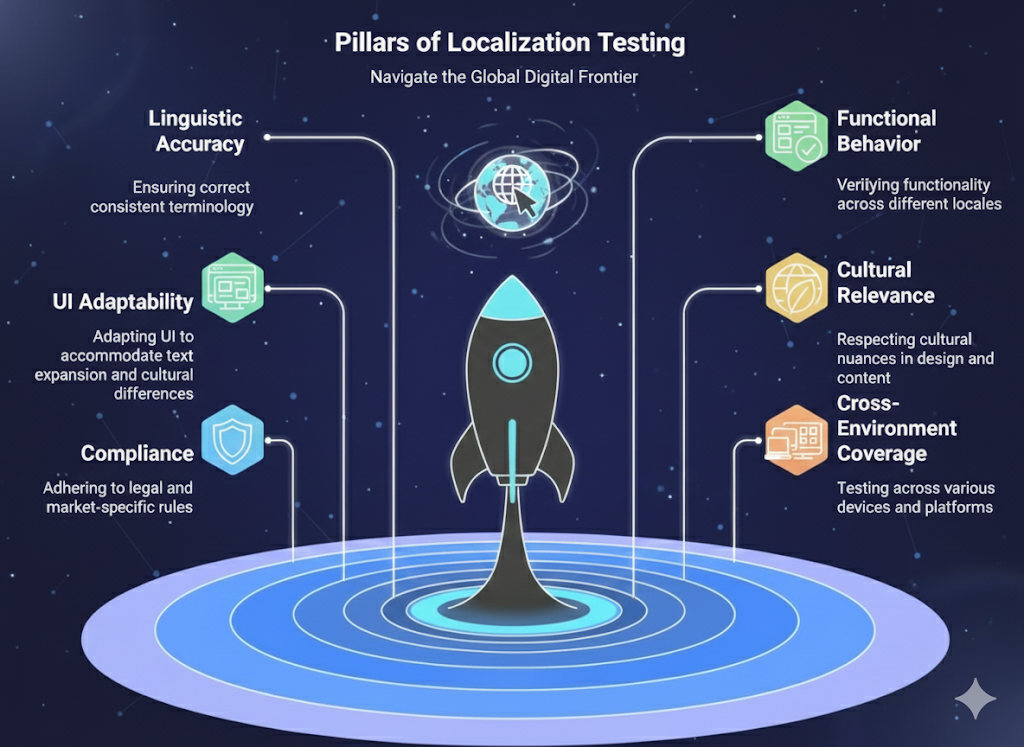
1. Linguistic Accuracy
This is the obvious one – correct translations, consistent terminology, tone that fits the region, and phrasing that makes sense in context. It’s surprising how often products get this wrong.
2. FunctionalBehaviorAcross Locales
Localization problems often show up as functionality issues: forms rejecting local characters, payment flows misbehaving, or search returning unexpected results. These aren’t “bugs in translation”, they’re true product breaks.
3. UI and Layout Adaptability
Text expands in German, contracts in Chinese, and flips right-to-left in Arabic. If the UI can’t stretch, wrap, mirror, or reorder itself, you’ll see broken screens immediately.
4. Cultural and Regional Relevance
A color, a symbol, a hand gesture, an image – small things carry different meanings across cultures. If the product doesn’t respect these nuances, it creates friction before the user even interacts with the core features.
5. Compliance and Market-Specific Rules
Legal text, consent flows, tax formats, address structures – every region has its own rules. Miss one detail and suddenly a seemingly harmless formatting error becomes a compliance issue.
6. Device, Browser, and Platform Differences
Localization issues don’t show up uniformly. A layout might break only on Safari, only on low-density Android screens, or only in certain OS language settings. This is why cross-environment coverage matters.
These six pillars are what separate “translated products” from truly global-ready products.
Common Mistakes of Localization Testing
Even experienced teams underestimate how localization issues actually surface in real products. It’s rarely the obvious things that break. It’s the details no one thinks about until they reach production.
1. Treating localization as a post-development activity
Many teams still localize after building the product. By then, the UI is rigid, strings are hard-coded, and workflows aren’t designed for variability. Fixing these later, costs far more.
2. Assuming translation vendors catch everything
Vendors translate, they don’t test. They don’t validate UI layouts, payment flows, error messages, or platform constraints. expecting them to catch product issues is a common misstep.
3. Ignoring internationalization (i18n) readiness
If strings aren’t externalized or Unicode isn’t fully supported, no amount of localization testing can save the release. i18n flaws surface late and create painful rework.
4. Underestimating UI breakage
Design teams usually optimize for one language. Everything looks beautiful, until your German, Finnish, or Arabic versions go live and start breaking layouts in unpredictable ways.
5. Not preparing multilingual test data
Real names, addresses, currencies, and scripts behave differently. Testing everything in English data hides 80% of localization issues.
Localization failures rarely come from one big mistake. They come from dozens of small assumptions.
A Practical Localization Testing Checklist
A good checklist won’t replace a full strategy, but it gives teams a clear baseline. If your product can pass most of these checks, you’re already ahead of many global releases.
1. Content readiness
Are all strings externalized, tagged, and free of hard-coded text?
2. Locale-aware functionality
Do forms, validations, search, filters, and workflows behave correctly for each market?
3. Date, time, number, and currency formats
Are these pulled from locale settings, not manually formatted?
4. Input and encoding support
Can your product handle accented characters, multi-byte scripts, and RTL inputs?
5. RTL/LTR compatibility
Does the UI mirror correctly in Arabic and Hebrew environments?
6. UI adaptability
Do layouts adjust for long words, line breaks, and text expansion without breaking?
7. Multilingual test data
Are you using region-appropriate names, addresses, and data variations in tests?
8. Automation triggers
Are automated checks running whenever content or locale configurations change?
This checklist isn’t exhaustive, but if you’re missing several items, localization issues will almost

The Everforth Quinnox Advantage: Outcome-Led Localization Testing
Modern engineering teams need a localization engine that can keep pace with global release cycles, shifting quality expectations and an increasingly multilingual user base. This is where our Application Testing as a Software (ATaS) makes a measurable difference – not by adding more manual testers, but by re-architecting how localization testing is executed, automated, and scaled using AI in software testing. ATaS brings the structure, acceleration, and reliability that traditional testing models simply can’t match.
With ATaS, global-readiness becomes a continuous capability, not a one-time activity. Qyrus, our AI-powered test automation platform ensures that every locale, every UI change, and every content update is validated consistently and rapidly, without slowing down your product teams.
Ready to Deliver Flawless Global Experiences? Let’s Talk.
If you’re expanding into new markets or already managing multilingual products, now is the time to modernize how your engineering and QA teams approach localization testing.
Whether you want to cut defect leakage, accelerate releases, or build a scalable localization workflow, we can help.
Book a free consultation with our experts and see how leading organizations run localization testing at enterprise scale.

Robins George
Head – Digital Marketing, Quinnox
Robins George is a digital marketing professional with extensive experience in positioning technology products and solutions across global markets. Passionate about simplifying technology, he shares insights that help organizations see clarity in a fast-evolving digital landscape. Outside of work, Robins enjoys traveling, hiking, and exploring emerging trends that spark fresh marketing ideas.
FAQs
Internationalization is the engineering work that makes a product ready for multiple languages – think structured strings, locale-aware logic, flexible UI layouts, and Unicode support. Localization happens after that: adapting the actual content, UI, formats, imagery, and workflows for a specific market. One makes global-readiness possible; the other brings it to life.
Much earlier than most teams assume. The ideal point is during development, alongside functional testing. Starting only after translation files arrive leads to UI breakage, truncations, and logic defects that are expensive to fix.
Yes, to a significant extent. UI regressions, string verification, locale-specific formats, currency/date/time rules, and even pseudo-localization can be automated. Linguistic quality still needs human review, but AI-assisted checks can reduce the load sharply.
Not always. In-market testers are valuable when cultural nuances or regulatory workflows are complex. For standard UI validation, automation combined with linguists is enough. Many enterprises use a hybrid model: machine-assisted checks + regional specialists for sensitive markets.
Anything that impacts payments, personal data, compliance flows, onboarding, checkout, or core conversion paths. A mistranslated CTA rarely kills adoption; a broken locale-specific payment option absolutely can.
Most teams rely on a mix of:
LQR (Localization Quality Rating)
Defect severity distribution by locale
LQA (Localization Quality Assurance) error density
UI breakage rate
Release-ready score across languages
The key is tracking trends – if the error count stays flat but the number of supported locales grows, you’re improving.
Start with three buckets:
Revenue gained from localized markets.
Cost avoided (defects, rework, hotfixes, reputation damage).
Velocity improvements (faster releases into new markets).
Most enterprises see ROI through faster activation of new regions rather than direct cost savings.
It simulates how your UI behaves in other languages – stretching strings, adding diacritics, injecting mirrored characters. You catch UI breakages long before translations arrive. It’s one of the fastest ways to de-risk global launches.
Treating localization as a “translation task” instead of a product engineering function. The result? Late surprises, broken UI, untested regional workflows, and frustrated users. Localization testing should live inside CI/CD, not on the side.