Introduction
Mobile apps have become the primary interface between businesses and their customers. Whether it’s banking, shopping, healthcare, logistics, or entertainment, users expect flawless performance across devices, operating systems, and network conditions. One crash, one laggy screen, or one broken flow can lead to uninstalls, negative reviews, and brand damage.
At the same time, development cycles are accelerating. Agile, DevOps, and CI/CD pipelines demand faster releases without compromising quality. Traditional mobile testing approaches such as manual scripts, static automation suites, and reactive bug fixing are no longer sufficient in a world of rapid releases, fragmented devices, and evolving user behavior. This is where Artificial Intelligence (AI) changes the equation, reshaping how organizations think about quality assurance, enabling predictive, adaptive, and intelligent testing ecosystems
In this blog, we’ll explore how to create an effective Mobile App Testing Strategy using AI – one that is scalable, data-driven, and built for modern digital ecosystems.
What is a Mobile App Testing Strategy?
A Mobile App Testing Strategy is a structured blueprint that defines how quality will be ensured across the lifecycle of a mobile application. It outlines the approach, scope, priorities, tools, environments, and processes used to validate functionality, performance, security, usability, and compatibility.
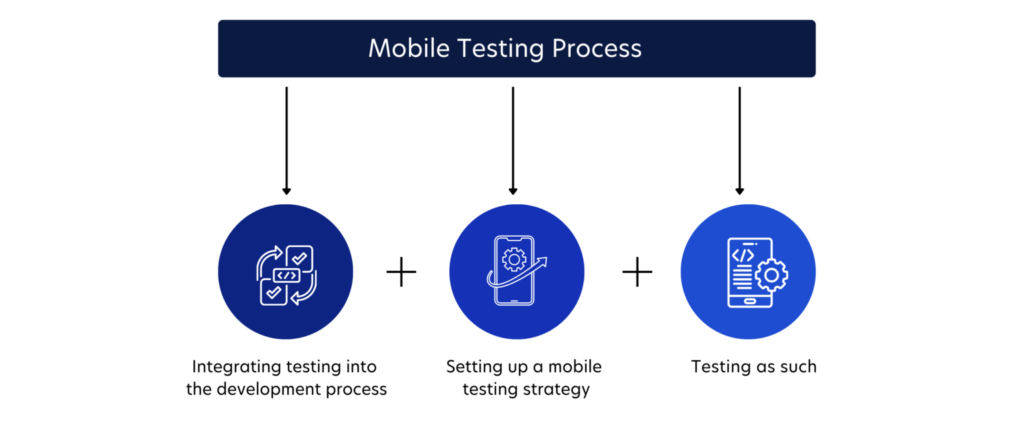
But at a leadership level, a testing strategy is more than documentation – it is a decision framework that answers critical questions:
- What level of risk is acceptable?
- Which devices and OS versions matter most?
- How do we balance speed and quality?
- How do we detect defects early?
- How do we ensure customer experience consistency?
A mature mobile testing strategy aligns with:
- Business objectives
- User expectations
- Regulatory requirements
- Release velocity goals
- Technology architecture
When AI is integrated into this strategy, testing evolves from reactive validation to proactive quality engineering.
Key Elements of an Effective Mobile Testing Strategy
An effective mobile application testing strategy does not begin with tools or test cases. It begins with clarity about business goals, user expectations, technical architecture, and acceptable risk.
Without this foundation, testing becomes reactive and fragmented, focused on finding bugs rather than engineering quality.
The key elements of a strong mobile testing strategy define how teams prioritize effort, allocate resources, and ensure consistent user experiences across devices and environments. Hence, before layering AI in software testing, the foundational elements must be clearly defined.
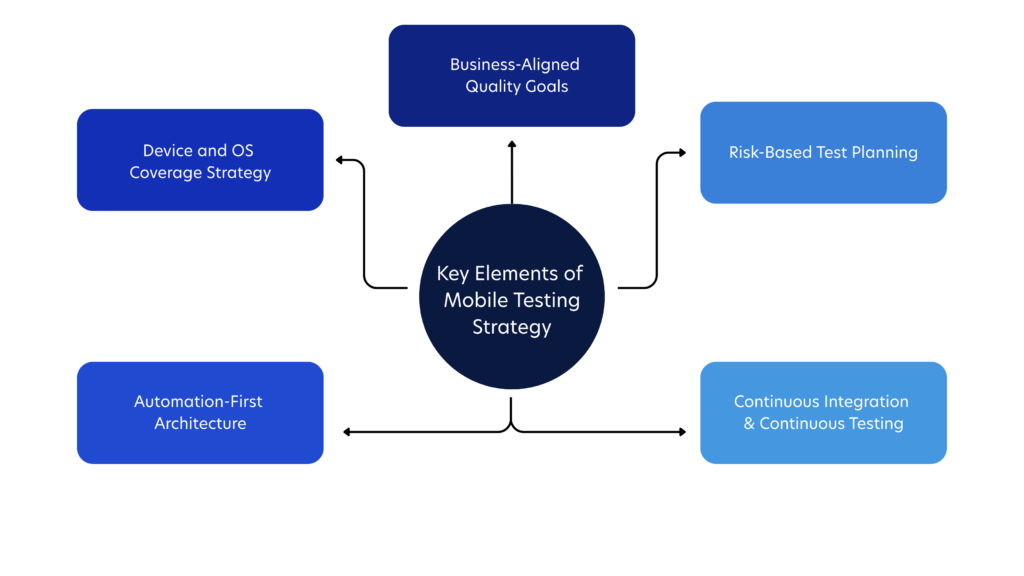
1. Business-Aligned Quality Goals
Quality must be measurable. Testing becomes strategic when it directly supports business performance metrics like retention, conversion, and customer satisfaction.
Hence, make sure to establish KPIs such as:
- Crash-free session percentage
- Defect leakage rate
- Mean time to resolution (MTTR)
- App startup time
- Test automation coverage
2. Risk-Based Test Planning
Not all features carry equal risk. High-transaction areas (e.g., payments, authentication, data sync) demand deeper validation. Hence, integrating AI into testing helps further in risk classification using historical defect and usage data, categorizing features by:
- Business impact
- User frequency
- Technical complexity
- Security sensitivity
3. Device and OS Coverage Strategy
Mobile fragmentation is a reality. Thousands of device combinations exist across Android and iOS ecosystems.
Instead of attempting universal coverage, define:
- Top devices by user analytics
- High-growth OS versions
- Edge-case devices for compatibility testing
A dynamic device matrix refreshed continuously will help keep testing relevant
4. Automation-First Architecture
Manual testing alone cannot sustain frequent releases. Automation must be embedded at each of the following levels to reduce human dependency, increases repeatability, and supports continuous testing:
- Unit level
- API level
- UI level
- Performance level
5. Continuous Integration & Continuous Testing
Testing must integrate seamlessly into CI/CD pipelines. Every code commit should trigger intelligent validation processes. AI amplifies this by deciding which tests to run and when to run them.
Where AI Enhances Mobile Testing
AI does not replace testing fundamentals—it optimizes them. Here’s where it creates transformational value:
1. Intelligent Test Case Generation
AI analyzes:
- User behavior data
- Production logs
- Historical defects
- Feature usage patterns
It identifies high-risk flows and suggests relevant test scenarios. This reduces blind spots and improves coverage quality.
2. Smart Test Prioritization
Instead of running the entire regression suite, AI evaluates:
- Code changes
- Dependency impact
- Past failure patterns
It prioritizes critical test cases, significantly reducing execution time while maintaining confidence.
3. Self-Healing Automation
UI changes often break automated scripts. AI-powered systems detect changes in:
- Element identifiers
- Layout shifts
- Dynamic components
They automatically adapt scripts, reducing maintenance effort and improving stability.
4. Visual Testing Through Computer Vision
AI models compare screen layouts across devices to detect:
- Misaligned elements
- Font inconsistencies
- Overlapping components
- Broken UI flows
This ensures visual consistency and brand integrity.
5. Predictive Defect Analytics
By analyzing code commits and historical bug trends, AI can predict:
- High-risk modules
- Probability of failure
- Areas likely to regress
Testing becomes predictive rather than reactive.
6. Performance Anomaly Detection
Instead of static thresholds, AI identifies abnormal patterns in:
- CPU usage
- Memory consumption
- Network latency
- Battery drain
It flags anomalies before they become user-visible problems.
AI-Powered Tools for Mobile App Testing
AI-powered tools are redefining how mobile testing is executed, maintained, and optimized.
Unlike traditional automation platforms that rely on predefined rules and rigid scripts, AI-enabled testing solutions learn from application behavior, historical defects, and usage patterns. They adapt, improve, and refine test execution over time – bringing intelligence into every phase of validation.
But, AI model testing and application testing is not just about automation speed. It is about precision, resilience, and decision support.
Let’s explore the core capabilities in greater depth:
1. AI-Driven Script Creation
Modern AI tools can analyze application flows, user journeys, and interface structures to automatically generate test scripts. Instead of manually designing test steps, teams can:
- Record user behavior and let AI convert it into structured automation scripts
- Automatically identify edge cases based on usage analytics
- Suggest additional scenarios based on risk patterns
This reduces the time spent writing scripts and shifts testers’ focus toward refining high-value scenarios and exploratory testing.
2. Visual Validation Engines
Mobile apps must deliver a consistent visual experience across multiple devices, resolutions, and orientations. AI-powered visual engines use computer vision algorithms to detect subtle UI issues such as:
- Misaligned elements
- Broken layouts on specific screen sizes
- Font or color inconsistencies
- Hidden or overlapping components
Unlike pixel-by-pixel comparisons, AI understands layout context. It distinguishes between intentional UI changes and unintended defects, minimizing false positives
3. Self-Healing Locators
One of the biggest pain points in mobile automation is script maintenance. Minor UI updates such as renaming an element or adjusting a layout can break multiple test scripts.
Self-healing technology uses AI to:
- Detect when an element has changed
- Identify alternative attributes
- Automatically update locators
This significantly reduces maintenance overhead and increases trust in automation reliability.
4. Smart Regression Selection
Running the entire regression suite for every release is inefficient and time-consuming. AI-enabled tools analyze:
- Code changes
- Dependency maps
- Past defect history
- Feature usage frequency
Based on this data, they select only the most relevant and high-risk test cases. This targeted approach shortens release cycles while preserving confidence.
5. Real-Time Defect Clustering
In large-scale test runs, hundreds of failures may occur simultaneously. AI systems can group similar defects based on error patterns, stack traces, and failure contexts.
This enables:
- Faster triage
- Clearer visibility into systemic issues
- Reduced duplication in bug reporting
Instead of manually reviewing every failure, teams receive organized, actionable insights.
6. Root Cause Suggestions
Some advanced AI platforms go further by analyzing failure patterns across builds and environments to suggest probable root causes. While not replacing human debugging, these insights accelerate investigation by pointing to:
- Recently modified code segments
- Specific device-related incompatibilities
- Configuration inconsistencies
The result is faster resolution and shorter feedback loops.
How to Evaluate AI Testing Tools Strategically
Adopting AI-powered tools should be a strategic decision, not an impulsive one. A well-selected tool should integrate seamlessly into your broader engineering ecosystem.
Here’s what to assess:
1. Integration with CI/CD Ecosystem
AI tools must align with your DevOps pipeline. They should:
- Trigger automatically on code commits
- Provide feedback within build systems
- Integrate with issue tracking platforms
Testing intelligence should be embedded within development workflows not isolated from them.
2. Scalability Across Cloud and Device Farms
Mobile testing requires access to diverse devices and environments. Ensure the tool can scale across:
- Cloud-based device farms
- Real-device testing environments
- On-premise infrastructure (if required)
Scalability ensures that AI insights remain relevant as user bases grow.
3. Transparency in AI Decision-Making
AI-driven decisions must be explainable. Teams should understand:
- Why certain test cases were prioritized
- How risk scores were calculated
- Why a defect was clustered in a specific way
Transparent models encourage adoption and informed decision-making.
4. Data Privacy and Compliance
Mobile apps often process sensitive user data. AI tools must comply with:
- Industry regulations
- Data storage policies
- Encryption standards
5. Customization and Flexibility
Every organization has unique testing needs. AI platforms should allow:
- Custom rule configuration
- Adjustable risk thresholds
- Integration with proprietary analytics
- Tailored reporting dashboards
In the end, success is not measured by how many AI features you deploy, but by how effectively those capabilities enhance release confidence, reduce risk, and elevate user experience.
Best Practices for Mobile App Testing Strategy
Integrating AI into your mobile testing strategy is not a plug-and-play transformation. It requires structured thinking, operational discipline, and long-term alignment with engineering and business objectives.
Below are foundational mobile application testing best practices that ensure AI delivers measurable, sustainable value.

1. Start with Clean, Structured, and Connected Data
AI systems learn from patterns. If the input data is inconsistent, incomplete, or poorly categorized, the outputs will be unreliable. Before introducing AI into your testing workflow, strengthen your data foundation.
This includes:
- Well-categorized defect logs with clear severity levels, affected modules, root causes, and resolution timelines
- Structured test case repositories with traceability to features and requirements
- Integrated production analytics that reflect real user behavior, crash reports, and performance metrics
Beyond organization, data must also be interconnected. For example, linking defect history with code changes and feature usage creates meaningful insight pathways for AI models.
2. Combine Human Expertise with AI Intelligence
AI excels at identifying correlations, detecting anomalies, and processing large datasets. However, it lacks contextual awareness, empathy, and business intuition.
Human testers contribute:
- Domain expertise that understands how users interact with the app in real-world scenarios
- UX sensitivity, recognizing when something “works” technically but feels wrong experientially
- Ethical and accessibility awareness, ensuring inclusivity and compliance with accessibility standards
- Critical thinking, challenging AI recommendations when they lack contextual fit
The most effective mobile testing environments position AI as a decision-support system. It provides signals; humans provide judgment.
Rather than asking, “Can AI replace testers?” forward-thinking organizations ask, “How can AI amplify tester effectiveness?”
3. Introduce AI Incrementally and Strategically
Large-scale AI rollouts often fail because they attempt transformation too quickly. A phased adoption model reduces risk and increases team confidence.
Therefore, a practical implementation path should look like this:
Phase 1 – Operational Efficiency Gains
- Smart regression selection
- Self-healing automation
- Automated defect clustering
Phase 2 – Intelligent Insight Generation
- Risk-based test prioritization
- Visual anomaly detection
- Performance trend analysis
Phase 3 – Predictive Quality Engineering
- Defect prediction modeling
- Release risk scoring
- Proactive failure forecasting
This gradual evolution ensures teams adapt culturally and technically. It also allows leadership to validate value before expanding investment.
4. Continuously Measure Impact and Business Value
AI adoption should be outcomes-driven, not feature-driven. Without measurable impact, AI initiatives lose executive support.
Key metrics to monitor include:
- Reduction in regression execution time
- Decrease in escaped defects
- Improvement in release cycle speed
- Lower automation maintenance effort
- Faster defect triage and resolution
Beyond operational metrics, connect testing improvements to business indicators such as user retention, app ratings, and incident reduction.
5. Embed Security and Compliance from the Beginning
Mobile applications frequently handle sensitive user data including financial information, personal identities, health records, and location details. Hence, testing strategies must incorporate security as a continuous priority, embedded within CI/CD workflows.
This is where integrating AI can help strengthen security validation by:
- Detecting abnormal behavior patterns in app interactions
- Identifying unusual data access or transmission activities
- Monitoring authentication flow anomalies
- Recognizing patterns associated with known vulnerability types
Rather than relying solely on periodic security audits, AI enables ongoing vigilance.
6. Maintain Governance and Ethical Oversight
As AI influences release decisions and risk scoring, governance becomes essential. Organizations should define:
- Approval processes for AI-driven release recommendations
- Clear accountability for override decisions
- Data usage policies
- Ethical boundaries in automated decision-making
Responsible AI governance ensures trust across technical and executive stakeholders.
Challenges in Mobile Testing & How AI Helps Overcome Them
Mobile testing is inherently more complex than traditional web or desktop testing. The mobile ecosystem is dynamic, fragmented, and deeply influenced by user context. Devices vary widely. Operating systems evolve rapidly. Network conditions fluctuate unpredictably. User expectations are unforgiving.
To build a resilient mobile testing strategy, leaders must first acknowledge these structural challenges and then apply AI intelligently to address them.
1. Device and OS Fragmentation
The Challenge: Unlike controlled desktop environments, mobile apps must function across thousands of device models, screen sizes, chipsets, and operating system versions. With over 6.4 billion mobile users globally, the vast diversity of devices has become a major challenge for both development and quality assurance teams.
Hence, testing every possible combination is impractical, costly, and time-consuming.
How AI Helps: AI analyzes real user analytics such as device usage distribution, crash frequency by model, geographic adoption patterns, and OS version penetration to dynamically prioritize device coverage.
Instead of testing blindly across a static device matrix, AI enables a usage-driven testing model, ensuring validation efforts are focused where real user impact is highest. This approach reduces waste while maintaining coverage confidence.
2. Rapid Release Cycles and Continuous Deployment
The Challenge: Modern mobile teams operate in short sprint cycles, sometimes releasing updates weekly or even daily. Full regression suites can take hours or days to execute, slowing delivery pipelines.
How AI Helps: AI introduces intelligent regression selection to help determine which tests are most relevant for a given release by analyzing:
- Code changes
- Dependency impact graphs
- Historical defect patterns
- Feature criticality
3. High Automation Maintenance Costs
The Challenge: Mobile UIs evolve frequently. Minor changes in element identifiers, layouts, or rendering structures can break automated scripts. Maintaining scripts often consumes more time than creating them.
How AI Helps: Self-healing automation leverages pattern recognition to:
- Detect when UI elements shift
- Identify alternative attributes
- Update locators dynamically
Instead of rewriting scripts after every UI change, AI adapts automatically. This stabilizes automation frameworks and reduces long-term maintenance overhead. The focus shifts from fixing scripts to improving test depth.
4. Flaky and Unreliable Tests
The Challenge: Mobile test environments are inherently unstable due to device resource variability, network simulation inconsistencies, and asynchronous app behavior. Flaky tests reduce trust in automation and slow down decision-making.
How AI Helps: AI identifies instability patterns by analyzing:
- Repeated intermittent failures
- Timing-related inconsistencies
- Environment-specific anomalies
It can flag unreliable tests, recommend stabilization adjustments, or isolate environmental factors. By increasing automation reliability, AI restores confidence in release decisions.
5. Real-World Network Variability
The Challenge: Users operate under diverse network conditions – Wi-Fi, 4G, 5G, low-bandwidth environments, and unstable connectivity. Testing under ideal lab conditions often fails to replicate real-world performance issues.
How AI Helps: AI models analyze performance behavior under varied simulated conditions and detect abnormal deviations in:
- API response times
- Data synchronization delays
- Timeout frequencies
- Battery and memory consumption
Rather than relying on static thresholds, AI detects contextual anomalies, providing deeper insight into how apps behave under stress. This improves resilience before users experience failures.
6. Production Defect Leakage
The Challenge: Despite rigorous testing, some defects inevitably escape into production. These failures can impact thousands or millions of users instantly.
How AI Helps: AI-driven predictive analytics examine:
- Code churn rates
- Commit complexity
- Developer change patterns
- Past defect density
Based on these factors, AI assigns risk probabilities to modules and features. This enables proactive testing focus before deployment, reducing the likelihood of high-impact production incidents.
Additionally, AI-powered monitoring systems detect abnormal crash patterns post-release, accelerating response times.
7. Performance Optimization Across Devices
The Challenge: Mobile apps compete not only on functionality but also on speed and responsiveness. Performance issues vary across hardware configurations, making optimization complex.
How AI Helps: AI continuously tracks performance metrics across builds and devices, identifying patterns such as:
- Gradual memory leaks
- CPU spikes tied to specific features
- Battery drain trends
- Performance degradation after incremental updates
Instead of reacting to user complaints, teams receive early warnings about performance regressions. This transforms performance testing into a predictive discipline.
8. Increasing Security Threats
The Challenge: Mobile apps process sensitive data like financial transactions, personal identities, health records. Security vulnerabilities can lead to regulatory penalties and loss of user trust.
How AI Helps: AI enhances mobile security testing by:
- Detecting anomalous access patterns
- Identifying suspicious data flows
- Recognizing behavior similar to known vulnerability exploits
- Continuously monitoring authentication flows
Rather than relying solely on periodic security audits, AI enables ongoing threat detection embedded within development pipelines.
9. Data Overload in Large Test Suites
The Challenge: Large organizations generate massive volumes of testing data. Manual analysis of those logs, failures, and metrics is time-intensive and error-prone.
How AI Helps: AI clusters similar failures, correlates logs across systems, and highlights meaningful insights instead of raw data noise. This reduces cognitive load for QA teams and accelerates root cause identification.
Sample Mobile Testing Workflow Using AI
A practical AI-enhanced testing workflow might look like this:
Step 1: Code Commit
Developer pushes code to the repository. AI analyzes code changes and predicts impacted modules.
Step 2: Risk Assessment
AI evaluates:
- Feature criticality
- Historical defect trends
- User traffic concentration
It assigns a risk score.
Step 3: Smart Test Selection
Based on risk scoring, AI selects:
- High-priority regression tests
- Relevant performance checks
- Targeted device combinations
Step 4: Automated Execution
Tests run across selected environments using self-healing scripts.
Step 5: Visual & Performance Analysis
AI validates:
- UI consistency
- Performance patterns
- Resource usage anomalies
Step 6: Defect Clustering & Root Cause Insight
AI groups similar failures and suggests likely root causes, accelerating triage.
Step 7: Release Confidence Scoring
Before deployment, AI provides a release health score based on:
- Test results
- Defect severity
- Risk predictions
Step 8: Post-Release Monitoring
AI monitors production metrics and flags abnormal crash patterns or behavioral deviations in real time. Testing then becomes continuous and intelligence-driven.
Conclusion
As device ecosystems grow more complex and release cycles accelerate, traditional testing models struggle to keep up.
AI brings the intelligence layer modern enterprises need – enabling predictive validation, risk-based prioritization, adaptive automation, and continuous monitoring. But tools alone do not guarantee transformation. What enterprises truly need is a structured framework that integrates AI into engineering culture, DevOps pipelines, governance models, and business outcomes.
This is where Quinnox’s Shift SMART with IQ framework transforms testing into a smarter, leaner, and more strategic process. Shift SMART seamlessly integrates into DevOps and Agile environments, where continuous integration and delivery (CI/CD) are critical. It aligns with these methodologies by automating testing, providing real-time feedback, and ensuring quality at every stage of the SDLC.
Ready to revolutionize your mobile testing strategies? Reach our experts today for a FREE personalized consultation today.

Assistant Manager, Marketing, Quinnox
FAQs
Yes, AI testing is reliable, but reliability depends on how it’s implemented and the quality of data it uses. AI excels at analyzing large datasets, predicting high-risk areas, and adapting test scripts dynamically – reducing human error and improving coverage across devices and OS versions. It is particularly effective for:
– Regression testing across multiple devices
– UI consistency and visual validation
– Predictive defect detection
– Performance anomaly monitoring
However, AI is not a replacement for human judgment. Reliability improves when AI augments experienced testers, integrates with real-world user analytics, and continuously learns from production feedback.
Absolutely. AI tools are not limited to automation. They can enhance manual testing workflows as well. Examples include:
Test case recommendation: AI suggests edge cases or missing scenarios based on historical defects.
Defect analysis assistance: AI clusters similar defects to help testers prioritize verification.
Visual validation support: AI can highlight UI inconsistencies that a manual tester might overlook.
Context-aware decision support: AI can flag high-risk areas in real-time, guiding testers on where to focus effort.
In short, AI complements manual testing by making it smarter, more data-driven, and less prone to oversight.
Not necessarily. Many AI-powered mobile testing platforms are designed with low-code or no-code interfaces, enabling testers to leverage AI capabilities without deep programming expertise. These platforms often provide:
Visual workflows for automation
Drag-and-drop test case design
Self-healing locators that auto-update scripts
AI dashboards for predictive insights
However, basic coding knowledge is still valuable for customizing scripts, integrating AI tools into CI/CD pipelines, or interpreting AI-driven analytics at a deeper level. Teams can combine technical and non-technical testers for optimal outcomes
Platforms that support AI powered mobile testing best are those that combine intelligent automation, adaptive test maintenance, visual validation, and predictive analytics across Android and iOS apps. Leading options include:
– AI enhanced test automation suites that generate and maintain tests using machine learning
– Visual testing tools with computer vision to catch UI inconsistencies across devices
– Smart regression and risk based testing platforms that prioritize tests based on code changes and historical failures
– Cloudbased device farms with integrated AI insights for scalable real device validation